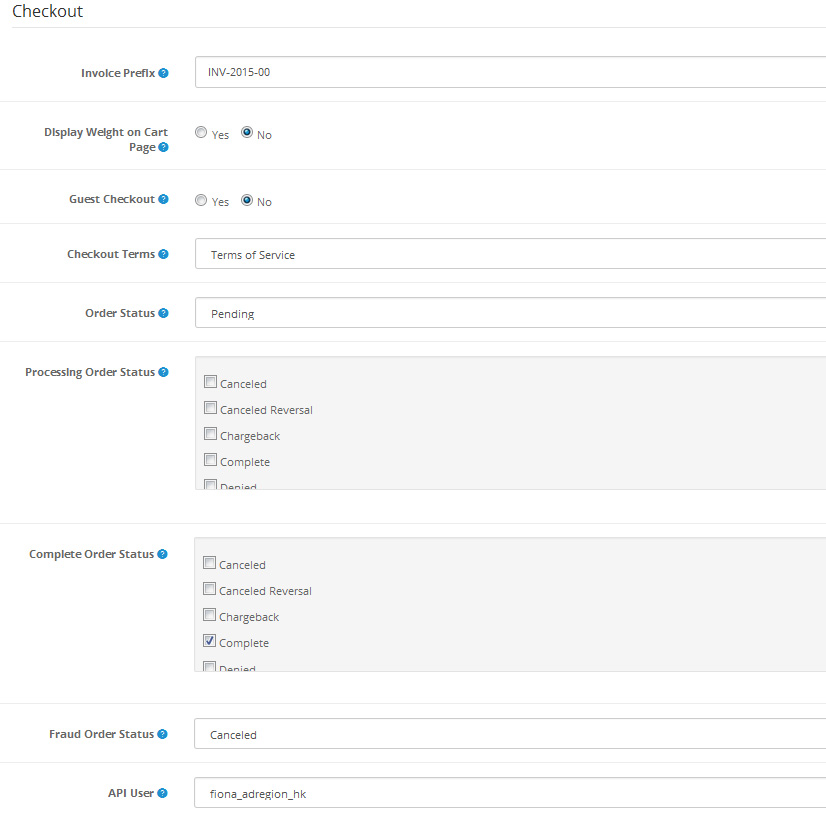
Checkout:
Invoice Prefix: Adds a prefix to each invoice order. OpenCart will add
an incremental number to the end of the prefix for every invoice.
Display Weight on Cart Page: Selecting ‘Yes’ will display the weight of a product
at the top of the Checkout page. For the weight to be displayed, there
needs to be a weight number added to the product under its Data tab. See
Products for more information.
Guest Checkout: Selecting ‘Yes’ enables users to go through the checkout process without
creating a store account. Selecting ‘No’ requires the user to create a
store account before checking out.
Checkout Terms: Selecting an Information page listed in the drop down box forces the
user to agree to the terms of that page in “Step 6: Confirm Order” of
checkout. Selecting ‘None’ lets the customer confirm their order without
agreeing to any terms.
Order Status: the default status of every order after the customer
confirms in checkout. The customer can view the status of their order in
the store front under My Account > My Orders. The status can be
edited in the Order section. See Orders for more information.
Processing Order Status:
Complete Order Status: the default status for a complete order.
Fraud Order Status:
API User: how to set API, please go to API setting

Stock:
Display Stock: the amount of product left in the store inventory.
Show Out Of Stock Warning: displays the an Out of Stock warning on the product page in the store
front, if the store is out of that particular order. A product will be
out of stock if its quantity in the Data tab reaches 0. It will reach 0
if the subtract stock option is selected. This option subtracts a stock
with every purchase of the product. See Products for more information.
Stock Checkout: lets the customer checkout a product if it is out of stock.
Affiliates:
Affiliate Requires Approval:
Automatic Commission: Automatically add commission when order reach complete status.
Affiliate Commission (%): the default percentage an affiliate will make from a customer purchase.
Affiliate Terms: makes an affiliate agree to the terms on one of the Information pages in order to make an affiliate account.

Returns:
Return Terms:
Return Status: the default status a customer will see in their account after
submitting a return form under Customer Service > Returns; displays
either “Awaiting Products”, “Completed”, or “Pending”.
