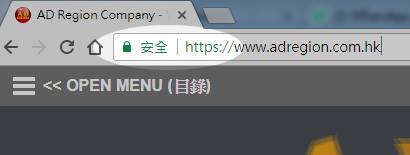
If your website is hosting will “AD Region Company”, your website can upgrade to “Let’s Encrypt SSL” at any time.
How to add SSL to your domain ?
If you are hosting with Us, you just simply login to your Control panel.
Go to My Domains >> click on Hosted Domains>> click to ” add SSL Certificate”
select “Let’s Encrypt SSL”
Now, you can see the icon which shows that your domain in under Let’s Encrypt SSL certificate protection.
————————————-
Let’s Encrypt is a new Certificate Authority (CA) that offers FREE SSL certificates that are just as secure as current paid certificates. This project was pioneered to make encrypted connections the default standard throughout the Internet.
The ‘Let’s Encrypt’ project is a large step forward for security and privacy on the Internet.
Benefits
Key benefits of using a Let’s Encrypt SSL certificate:
- It’s free – Anyone who owns a domain can obtain a trusted certificate for that domain at zero cost.
- It’s automatic – The entire enrollment process for certificates occurs painlessly during the server’s native installation or configuration process. The renewal occurs automatically in the background.
- It’s simple – There’s no payment, no validation emails, and certificates renew automatically.
- It’s secure – Let’s Encrypt serves as a platform for implementing modern security techniques and best practices.
Difference between a free Let’s Encrypt certificate and a paid Comodo certificate
There is no difference in the encryption protection these certificates offer. However, ‘Let’s Encrypt’ certificates only provide domain domain validation (DV) certificates. ‘Let’s Encrypt’ certificates do not support Organizational Validation (OV) certificates.
What’s the difference?
(DV) certificates can only ensure a secure connection to the website. Anyone with admin rights to the website’s panel can add a ‘Let’s Encrypt’ certificate. After adding in the panel, the certificate is added automatically.
(OV) certificates validate everything a (DV) does, while also validating additional organizational information about who is purchasing the certificate such as their Name, City, State, Country. (OV) certificates require the user to respond to an email with a verification code. This code must then be entered into Comodo’s website.
Should you use a ‘Let’s Encrypt’ or paid Comodo certificate?
If your website is a business that’s processing credit cards or transmitting sensitive information, it’s recommended that you add a paid Comodo certificate so your user’s can rest assure the connection is valid and secure.
Simple websites that need the same level of encryption without the absolute guarantee of ownership can continue to use a ‘Let’s Encrypt’ certificate.
Rate limits
‘Let’s Encrypt’ has set up rate limitations to help protect their servers. Limits are as follows:
- Names/Certificate – Limit on how many domain names you can include in a single certificate. This is currently limited to 100 names, or websites, per certificate issued. Certificates per domain you could run into through repeated re-issuance. This limit measures certificates issued for a given combination of Public Suffix + Domain (a “registered domain”). This is limited to 5 certificates per domain per week.
- Registrations/IP address – Limits the number of registrations you can make in a given time period; currently 500 per 3 hours. This limit should only affect the largest users of Let’s Encrypt.
- Pending Authorizations/Account – Limits how many times an ACME client can request a domain name be authorized without actually fulfilling on the request itself. This is most commonly encountered when developing ACME clients, and this limit is set to 300 per account per week.