Skip to content
  • 中文 (香港)
  • Home
  • Opencart Installation
    • Admin Interface
    • Extensions
    • Sales
    • Marketing
    • Catalog
    • Design
    • Customers
    • System
    • Opencart Installation Problem
  • WordPress Installation
    • WordPress Free Template
    • WordPress Installation Problem
  • Website Set Up FAQ
    • Set up email
  • AD Region News Feed
    • Web Hosting Plan (Free Domain)
    • Domain Name Register

AD Region Company – FAQ

If you meet any problems with website installation, you are in the right place.

  • 中文 (香港)
  • Home
  • Opencart Installation
    • Admin Interface
    • Extensions
    • Sales
    • Marketing
    • Catalog
    • Design
    • Customers
    • System
    • Opencart Installation Problem
  • WordPress Installation
    • WordPress Free Template
    • WordPress Installation Problem
  • Website Set Up FAQ
    • Set up email
  • AD Region News Feed
    • Web Hosting Plan (Free Domain)
    • Domain Name Register

Blog

After you install extension, got error message and cannot login to admin panel.

October 1, 2017 faq_adminOpencart Installation Problem

No matter you logout and login again, the error message still there and even did not allow you to go back to extension section to delete the extension which leads you error message. 1. If Yes, please go to opencart.com Read More

When you install a new extension with opencart 2.3.0.2, you got “permission denied” error.

October 1, 2017 faq_adminOpencart Installation Problem

Most likely you’re trying to install an extension that is not compatible with OpenCart 2.3.0.2. OpenCart 2.3.X introduced some changes related to extension structure, so you will have to make those changes first.   Path change: All of the extension Read More

How to Install Vqmod

October 1, 2017 faq_adminOpencart Installation Problem

I highly recommend install Vqmod and Vqmod manager at the beginning of your store setup.   download the latest vqmod from web. unzip the file and upload the hold vqmod folder to your server. vQmod advises you to set the Read More

How to edit footer’s copyright

October 1, 2017 faq_adminOpencart Installation Problem

Edit file: catalog/language/Your_language_folder/common/footer.php find: $_[‘text_powered’]      = ‘Change to your copyright or information’ Then save and upload to replace the old file.

How to modify top menu/netvigator bar’s contents or color, fonts and size

October 1, 2017 faq_adminOpencart Installation Problem

There are 2 Ways top menu’s content:   One is install an extension which adds information pages to the top menu, or the Second is use manually edit catalog/view/theme/default/template/common/header.tpl   For Example, if you want to add any information page Read More

File upload error! Invalid file type!

October 1, 2017 faq_adminOpencart Installation Problem

Go to “System” >> Settings >> your store   Go to ” Server” tab, at “Allowed File Mime Types” , and then add mime types: for example, if you want to upload rar file, Then in the column must have Read More

Forget my Opencart’s admin password

October 1, 2017 faq_adminOpencart Installation Problem

Log into Control Panel and click on php MyAdmin Open the database that your OpenCart store uses Find the “user” table Find your admin account and edit the  password field to e10adc3949ba59abbe56e057f20f883e Then go back to your admin area and Read More

Changing domain name on Opencart

October 1, 2017 faq_adminOpencart Installation Problem

OpenCart has 2 config files which define the domain paths in use: Log into your site’s cPanel Open the “File Manager” and navigate to your /public_html/ folder if you have OC installed in the root, otherwise navigate to the correct Read More

Incorrect api key” problem

October 1, 2017 faq_adminOpencart Installation Problem

  If you have recently upgraded your Opencart software above version 2.++ then you can may face this problem. Because Opencart added this new feature for store security purpose in Opencart admin panel.   So I think here is solution Read More

Option 2

October 1, 2017October 1, 2017 faq_adminSettings

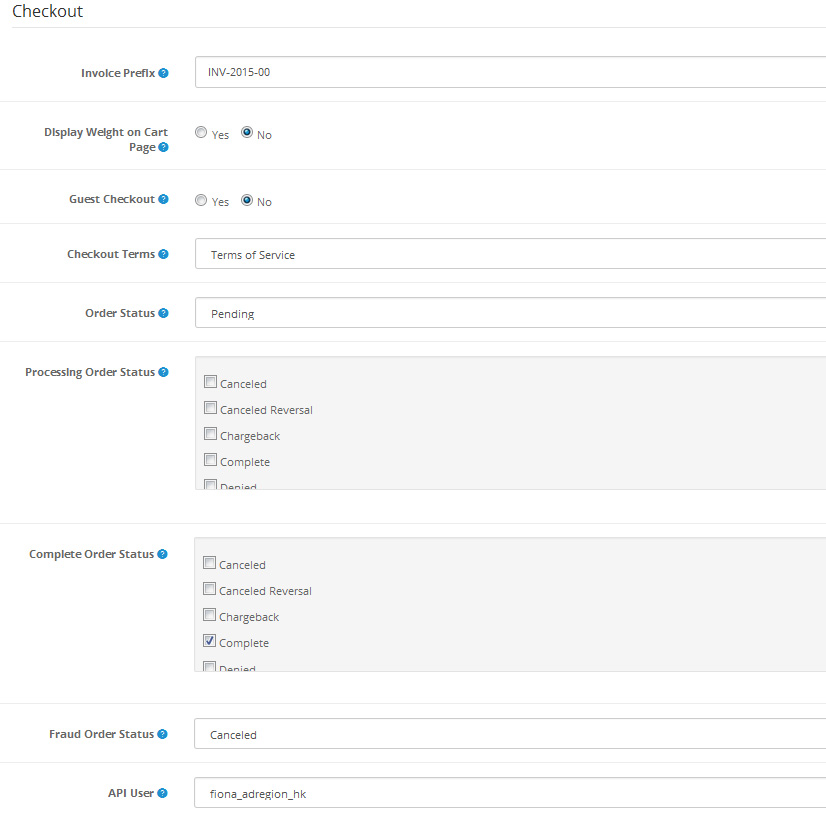
Checkout: Invoice Prefix: Adds a prefix to each invoice order. OpenCart will add an incremental number to the end of the prefix for every invoice. Display Weight on Cart Page: Selecting ‘Yes’ will display the weight of a product at Read More

Posts pagination

Previous 1 … 3 4 5 … 8 Next

Meta

  • Log in
  • Entries feed
  • Comments feed
  • WordPress.org

www.adregion.hk

Tel: +852 2564 8324

support@faq.adregon.hk

AD Region Company Facebook page

Help set up Opencart/Wordpress website

Graphic Design, Photography, Website Design, Printing

Website Hosting, Domain Register, Free SSL Certificate

Copyright © 1997-2026 AD Region Company. All rights reserved.
Supported & Powered by www.adregion.net